If your Nissan suddenly shows a strange icon, don’t panic. Understanding nissan dashboard symbols and meanings helps you know whether your vehicle needs attention, routine service, or immediate action before continuing your journey.
Modern Nissan vehicles use many nissan dashboard symbols and meanings to communicate what is happening beneath the hood. Some lights simply show an active feature, while others warn you about a problem that could affect safety.
The ultimate guide to understanding your Nissan’s dashboard symbols, indicators, warning lights, and their meanings
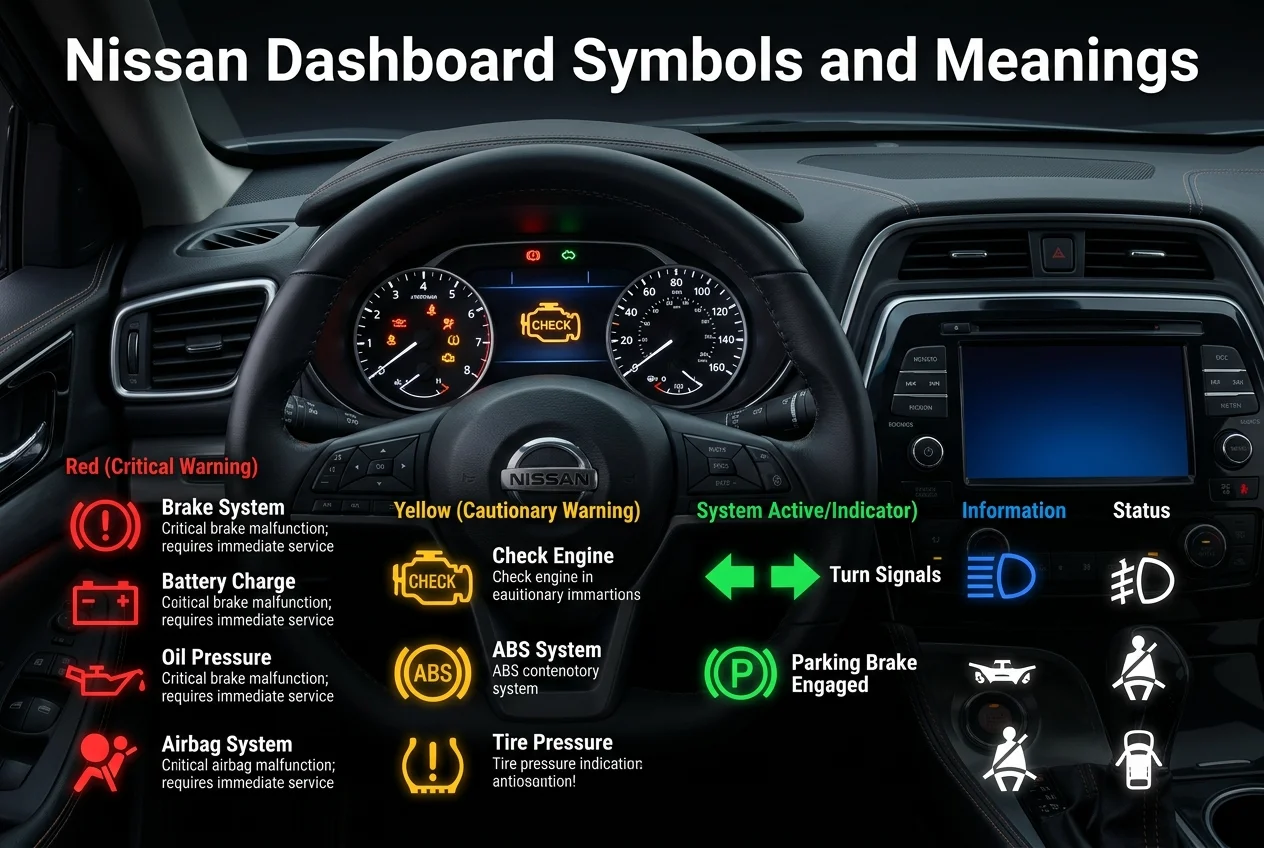
Your Nissan dashboard works like a communication system between you and the vehicle. Nissan dashboard symbols and meanings can tell you about active features, maintenance needs, or problems involving brakes, tires, engine systems, charging components, and safety equipment.
The most important clue is usually the light’s color:
- 🔴 Red: Urgent attention may be needed
- 🟡 Yellow/Amber: Check the vehicle or schedule service
- 🟢 Green: Feature is operating
- 🔵 Blue: Feature such as high beams is active
- ⚪ White: Feature or system status information
These colors provide a quick starting point, but the exact symbol and vehicle message should always be considered together.
Indicator Lights vs. Warning Lights
Indicator lights mainly provide information about features currently operating. They may show headlights, high beams, turn signals, or driver-assistance functions. Warning lights are different because they alert you to a condition that may need attention.
Think of them this way:
- 🟢 Indicator: “This feature is working.”
- 🟡 Warning: “Check this soon.”
- 🔴 Serious warning: “Pay attention immediately.”
A yellow warning usually needs action soon, while a red warning can require you to stop safely depending on the symbol and vehicle behavior.
Battery Charge Warning Light
🔋 Battery/Charge Warning: This light can indicate a charging-system problem involving the battery, alternator, wiring, or another electrical component. It is not simply a reminder that your battery is old.
⚠️ If it remains illuminated while the engine is running:
- Pull over safely when possible.
- Avoid unnecessary electrical loads.
- Arrange professional assistance if the warning remains.
Continuing to drive could eventually leave the vehicle without enough electrical power.
Brake Warning Light
🛑 Brake Warning: This light can relate to the parking brake, low brake fluid, worn brake components, or another braking-system concern. If it stays on after releasing the parking brake, stop safely and arrange an inspection.
Engine Oil Pressure Warning Light
🛢️ Oil Pressure Warning: This can indicate low oil pressure involving the oil level, pump, filter, sensor, or related components. Stop the engine safely because continued operation with low oil pressure can cause serious damage.
Airbag Warning Light
🛡️ Airbag Warning: An illuminated airbag light can indicate a problem involving the supplemental restraint system. Because airbags are important safety equipment, do not ignore this warning or delay inspection unnecessarily.
Electric Shift Control System Warning Light
⚙️ Shift Control Warning: This warning can indicate a possible issue with the electronic shift-control system. Because proper shifting is important for vehicle operation, follow the display instructions and contact Nissan service if it remains illuminated.
Electronic Parking Brake Warning Light
🅿️ Electronic Parking Brake: This warning can indicate a problem involving the electronic parking brake. If the brake does not operate normally or the warning stays on, have the system inspected rather than assuming the light is harmless.
Hands Off Warning Light
🙌 Hands OFF Warning: This light relates to Nissan’s steering-assistance system and reminds the driver to keep their hands on the steering wheel. It does not mean the vehicle is designed for unrestricted hands-free driving.
Master Warning Light
⚠️ Master Warning: This is a general alert that can appear with another warning message. Check your vehicle information display because the accompanying message provides more useful information about what triggered the warning.
Seat Belt Warning Light
🔒 Seat Belt Warning: This reminds occupants to fasten their seat belts. If the warning or related audible alert continues, check that required occupants are properly buckled before driving.
Front Passenger Airbag Status Light
👤 Passenger Airbag Status: This indicator shows the status of the front passenger airbag system. Its meaning can depend on passenger conditions, so use the vehicle display and owner’s manual for model-specific guidance.
Anti-lock Braking System (ABS) Warning Light
🚨 ABS Warning: This indicates a possible problem with the anti-lock braking system. Regular braking may still be available, but ABS protection may not work as intended, so prompt inspection is recommended.
Automatic Emergency Braking (AEB) System Off Warning Light
🚗 AEB OFF: This warning indicates that automatic emergency braking may be switched off or unavailable. Check the vehicle display and follow Nissan’s instructions because some driver-assistance protection may be reduced.
Electronic Power Steering Warning Light
🛞 Power Steering Warning: This can signal a problem with steering assistance. If steering suddenly becomes unusually heavy or difficult, slow down safely and have the system inspected.
Electronic Parking Brake System Warning Light
🅿️ Parking Brake System: This warning points to a possible electronic parking brake system issue. Check whether the brake operates correctly, then consult the owner’s manual or Nissan service if the warning continues.
Tire Pressure Monitoring System (TPMS)
🛞 TPMS Warning: This means one or more tires may have low pressure. Check all tires and inflate them to the recommended level.
Low tire pressure can affect:
- 🚘 Handling
- 🛞 Tire wear
- ⛽ Fuel efficiency
Cold temperatures can also reduce tire pressure enough to trigger the warning.
Check Engine Light or Malfunction Indicator Light (MIL)
🔧 Check Engine/MIL: This light can relate to engine or emissions-system problems. A steady light generally calls for service, while a flashing light combined with poor performance requires more urgent attention.
Rear Automatic Braking (RAB) System Off Warning Light
🚗 RAB OFF: This warning indicates that rear automatic braking is switched off or unavailable. Because the feature may not intervene as expected, check the display and restore operation when appropriate.
Stability Control Warning/Slip Indicator Light
⚠️ Slip Indicator: This symbol can relate to stability-control operation or a related system condition. If it remains illuminated unexpectedly, check the display and owner’s manual, especially if handling or traction feels different.
Automatic Brake Hold Indicator Light
🟢 Green: Automatic Brake Hold is active.
⚪ White: Automatic Brake Hold is in standby.
The colors communicate the feature’s current status rather than automatically indicating a mechanical fault.
Exterior Light Indicator
💡 Exterior Light: This indicator shows that the vehicle’s exterior lighting system is operating. It is generally an informational signal rather than a warning about a mechanical problem.
Front Fog Light Indicator
🌫️ Fog Light: This indicator confirms that the front fog lights are switched on. It mainly communicates lighting status rather than indicating that your Nissan has developed a mechanical fault.
High Beam Assist Indicator Light
🔵 High Beam Assist: This indicator relates to Nissan’s automatic high-beam function. It communicates the feature’s status and should not automatically be interpreted as a lighting-system failure.
Turn Signal/Hazard Indicator Lights
↔️ Turn Signal/Hazard: These indicators confirm that the corresponding exterior lights are operating. They are normal informational signals, although you should always remain alert to traffic and road conditions.
High Beam Indicator Light
🔵 High Beam: This indicator confirms that your high beams are switched on. Turn them off when approaching other traffic so you do not reduce another driver’s visibility.
Read More: Mood Rings Colors and Meanings: A Great Way of Self-Discovery
Your Nissan will take care of you if you take care of it.
Your Nissan gives you useful clues when something needs attention. Learning Nissan dashboard lights helps you react calmly instead of guessing when an unfamiliar symbol suddenly appears.
A quick response can prevent a small issue from becoming a larger problem. Check the symbol, color, vehicle information display, and owner’s manual before deciding what action to take.
Understanding Nissan Dashboard Lights: What They Mean and When to Take Action
Dashboard lights can signal an active feature, maintenance reminder, or system problem. Nissan dashboard symbols and meanings become easier to understand when you identify the color and read the accompanying display message.
Not every illuminated symbol means you must stop immediately. Some indicators simply confirm normal operation, while warning lights may require service or urgent action.
What Do Nissan Dashboard Light Colors Mean?
The color gives you a useful first clue:
| Color | General meaning | What to do |
|---|---|---|
| 🔴 Red | Urgent warning | Stop safely when appropriate |
| 🟡 Yellow/Amber | Attention needed | Check and arrange service |
| 🟢 Green | Active feature | Continue normally |
| 🔵 Blue | Active feature | Observe normal conditions |
| ⚪ White | Status information | Check display if needed |
Color is only the first clue. The exact symbol, flashing behavior, warning message, and vehicle symptoms should also guide your response.
Red Lights
🔴 Red lights generally deserve the highest level of attention. Brake, oil-pressure, charge, airbag, and other red warnings can indicate conditions where continuing to drive may be unsafe.
Yellow or Amber Lights
🟡 Yellow or amber lights usually mean the vehicle needs attention soon. Common examples include check engine, low tire pressure, ABS, slip, and driver-assistance warnings.
Green, Blue, or White Lights
🟢🔵⚪ Green, blue, and white indicators generally communicate that a feature is active or operating. Lighting functions and Automatic Brake Hold are examples of these informational indicators.
Nissan Dashboard Symbols and Meanings Chart
A quick chart makes Nissan warning symbols easier to scan when you’re behind the wheel. The key is knowing whether a light represents urgency, service needs, or normal operation.
| Symbol color | Meaning | Response |
|---|---|---|
| 🔴 Red | Serious warning | Pull over safely when required |
| 🟡 Yellow | Attention needed | Investigate and arrange service |
| 🟢 Green | Feature active | Normal operation |
| 🔵 Blue | Feature active | Normal operation |
| ⚪ White | Status information | Follow display instructions |
Red Nissan Warning Lights
🔴 Red Nissan warning lights are generally the most urgent. Brake, oil pressure, charge, and airbag warnings deserve particular attention because they can involve braking, engine lubrication, electrical power, or occupant safety.
Yellow Nissan Warning Lights
🟡 Yellow Nissan dashboard symbols and meanings often point toward conditions that need attention rather than immediate stopping. Check engine, low tire pressure, ABS, slip, and driver-assistance warnings are common examples.
Other Nissan Indicator Lights
🟢🔵⚪ Other Nissan dashboard symbols and meanings simply show that a feature is operating. Lighting indicators, high beams, turn signals, and Automatic Brake Hold can appear without indicating a vehicle malfunction.
Red Nissan Warning Lights: When To Stop Driving
When a red warning appears, don’t automatically assume it is safe to continue. The correct response depends on the symbol, vehicle behavior, and accompanying message, but serious red warnings generally deserve immediate attention.
Brake Warning Light
🛑 A brake warning that remains illuminated after releasing the parking brake can indicate low brake fluid, worn components, or another braking-system problem. Pull over safely and arrange an inspection rather than taking chances.
Engine Oil Pressure Warning Light
🛢️ If the oil-pressure warning appears, safely stop the engine. Low oil pressure can prevent proper lubrication, so continuing to run the engine may cause severe internal damage.
Charge Warning Light
🔋 A charge warning appearing while the engine runs can indicate a charging-system problem involving the battery, alternator, or electrical system. Pull over safely because electrical power may eventually become unavailable.
Airbag Warning Light
🛡️ An illuminated airbag warning can indicate a supplemental restraint-system issue. Because the system is designed for occupant protection, arrange an inspection promptly and follow your vehicle’s specific safety instructions.
Yellow Nissan Warning Lights: Schedule Service Soon
🟡 Yellow Nissan dashboard symbols and meanings generally tell you that something needs attention, but the vehicle may remain driveable depending on the specific warning. Check the display, perform simple checks, and schedule service when necessary.
Nissan Check Engine Light
🔧 A steady check engine light may indicate an engine, emissions, sensor, or related system issue. A flashing light, especially with poor performance, should be treated more urgently and may require stopping safely.
Low Tire Pressure Warning Light
🛞 The low tire pressure warning means one or more tires may be underinflated.
Before continuing, check:
- 🛞 All four tires
- 📏 Recommended pressure
- ❄️ Recent temperature changes
- 🔍 Visible tire damage
Cold temperatures can reduce tire pressure and trigger the warning.
ABS Warning Light
🚨 The ABS warning can indicate that anti-lock braking is unavailable. Normal braking may still function, but the vehicle may not have its expected anti-lock safety function, so professional inspection is recommended.
Slip Indicator Light
⚠️ The slip indicator relates to stability-control operation or a related system condition. If it stays illuminated unexpectedly, consult the display and owner’s manual, especially if handling or traction feels different.
Green, Blue, and White Nissan Indicator Lights
🟢🔵⚪ Green, blue, and white Nissan dashboard symbols and meanings generally communicate normal operation rather than a mechanical emergency. Lighting functions, high beams, and certain driver-assistance features can use these colors to show their current status.
Read More: Cat Tail Meanings: What Your Cat Tail Says
When To Pull Over vs. When To Drive to Service
Knowing whether to stop or continue carefully is one of the most useful parts of understanding Nissan dashboard symbols and meanings. Consider both the warning color and how your vehicle feels while driving.
Pull Over Safely If You See:
🛑 Consider pulling over safely when you see situations such as:
- 🛢️ Oil pressure warning
- 🛑 Brake warning that stays on
- 🔋 Charge warning while the engine is running
- 🔧 Flashing check engine light with poor performance
- 🔴 Red warning combined with smoke, unusual smells, shaking, or loss of power
These conditions can signal potentially serious or safety-related problems.
Schedule Service Soon If You See:
🔧 Arrange service soon for warnings such as:
- 🔧 Steady check engine light
- 🚨 ABS warning
- 🛞 Low tire pressure warning
- 🛡️ Airbag warning
- ⚠️ Slip indicator
- 🔧 Maintenance reminder
If the vehicle feels normal, it may sometimes be possible to drive carefully to service, but the exact response depends on the warning and your Nissan model.
Simple Checks Before Scheduling Nissan Service
Before calling for service, check a few simple things:
- ⛽ Make sure the fuel cap is secure.
- 🛞 Check tire pressure.
- 🅿️ Make sure the parking brake is released.
- 💧 Look for unusual fluid leaks.
- 👃 Notice unusual smells.
- 🔊 Listen for unusual sounds.
- 🚗 Watch for shaking or loss of power.
Also check whether the warning is steady or flashing and read the vehicle information display. Cold weather can lower tire pressure enough to trigger a TPMS warning.
Common Nissan Service Lights and Maintenance Alerts
🔧 Some Nissan service lights are reminders rather than emergencies. Depending on the vehicle, you may see:
- 🛢️ Oil-change reminder
- 🛞 Tire-rotation reminder
- 🔧 Inspection reminder
- 🧰 Scheduled maintenance notification
- 🔩 Wrench symbol
- ⚠️ Exclamation-mark warning
- 🔧 Service or maintenance message
These reminders help you keep up with routine vehicle care before smaller maintenance needs become bigger problems.
Nissan Dashboard Symbols by Model
Nissan uses many common warning categories across its lineup, but exact symbols and messages can vary by model, year, trim, and available technology.
Always confirm an unfamiliar symbol using:
- 📖 Your Nissan owner’s manual
- 🖥️ Vehicle information display
- 🔧 Nissan service information
The owner’s manual remains the best reference for your exact vehicle.
Nissan Kicks Dashboard Symbols
🚙 Nissan Kicks models can display warnings involving braking, tire pressure, driver assistance, lighting, and vehicle systems. Exact symbols depend on the model year, trim, and equipment installed. Check the Kicks owner’s manual for confirmation.
Nissan Altima Dashboard Symbols
🚘 Altima dashboard symbols can vary between model years and equipment levels. If a symbol looks unfamiliar, use the Altima owner’s manual and vehicle information display instead of relying only on a generic online chart.
Nissan Sentra Dashboard Symbols
🚗 Sentra drivers may see symbols for braking, tire pressure, engine systems, stability control, lighting, and driver assistance. The exact dashboard display can change according to year, trim, and technology package.
Nissan Rogue Dashboard Symbols
🚙 Rogue models may use numerous driver-assistance and safety indicators alongside traditional engine, brake, tire, and lighting warnings. Always confirm the exact meaning through the Rogue’s owner’s manual for your vehicle.
Nissan Versa, Pathfinder, Frontier, and Armada Warning Lights
🚘 Versa, Pathfinder, Frontier, and Armada vehicles can share common warning categories, but their dashboards are not identical. Model year, trim, and technology can change which symbols appear and how messages are displayed.
Nissan Diagnoses Dashboard Warning Lights
🔧 Professional diagnosis goes beyond simply reading a symbol. Nissan-approved diagnostic equipment can help identify fault codes and investigate:
- 🔋 Battery and alternator systems
- 🛑 Brake components
- 🛞 Tires and TPMS
- 🔧 Engine and emissions
- 🛡️ Airbags and pretensioners
- 🚗 Driver-assistance sensors
A technician can combine diagnostic information with warning messages and vehicle symptoms to identify the actual cause instead of replacing parts based only on a dashboard icon.
Nissan Dashboard Symbols FAQs
What does a red Nissan dashboard light mean?
🔴 A red light generally signals an urgent safety or system concern. Depending on the symbol, you may need to stop safely and arrange assistance rather than continuing your trip.
What does a yellow Nissan warning light mean?
🟡 A yellow or amber warning usually means your vehicle needs attention soon. Check the display, perform simple checks when appropriate, and schedule service if the warning remains.
What does the Nissan check engine light mean?
🔧 The check engine light can indicate an engine, emissions, or related system problem. A steady light generally calls for service, while a flashing light with poor performance needs more urgent attention.
What does the Nissan tire pressure light mean?
🛞 The tire pressure light usually indicates that one or more tires may have low pressure. Check all tires and inflate them to the recommended pressure before continuing normally.
Can I drive with a Nissan ABS warning light on?
🚨 The vehicle may retain normal braking, but ABS may not operate as intended. Drive cautiously and arrange inspection rather than assuming the warning can be ignored.
Why did my Nissan tire pressure light come on when it got cold?
❄️ Cold temperatures can reduce tire pressure enough to trigger the TPMS warning. Check every tire and adjust pressure to Nissan’s recommended specification.
What does the battery-shaped light mean on a Nissan?
🔋 The battery-shaped light generally relates to the charging system, not simply battery age. It can involve the battery, alternator, or electrical system and should be checked if it stays on.
What does the oil can symbol mean on a Nissan?
🛢️ The oil-can symbol represents the engine oil-pressure warning. If it illuminates while driving, safely stop the engine and investigate because low oil pressure can cause serious engine damage.
What does the master warning light mean on a Nissan?
⚠️ The master warning light is a general alert. Look at the vehicle information display for the accompanying message because that information helps identify the condition requiring attention.
Do Nissan dashboard symbols vary by model?
🚘 Yes. Symbols and warning messages can vary by Nissan model, model year, trim, and available technology. Always use the owner’s manual for your specific vehicle when a symbol is unfamiliar.
Understanding nissan dashboard symbols and meanings turns confusing dashboard icons into useful information. Once you recognize colors and common warnings, you can respond calmly and make safer decisions.
Remember that nissan dashboard symbols and meanings are not a substitute for your owner’s manual or professional diagnosis. When a warning is serious, stop safely, protect yourself and others, and seek qualified assistance.

MeaningShelf shares meaningful quotes, thoughtful messages, and helpful word meanings, managed by Lily Anderson, an SEO content writer with 2 years of experience, creating engaging content that inspires readers and helps them find the right words for every moment.
2 thoughts on “Nissan Dashboard Symbols and Meanings: Complete Guide”